
Overview
Intelligent Reboot watches your internet connection. If it goes down and stays down, the Rebooter Pro restarts your modem or router automatically.
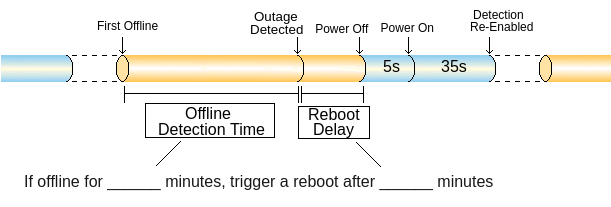
Timing Settings
You can change both settings in the ConnectSense app.
Detection Time
- How long your internet must be down before the Rebooter Pro counts it as an outage.
- Default: 2 minutes
- Range: 2 to 10 minutes
- If your modem or router takes a while to start up, try increasing this.
Reboot Delay
- Extra time the Rebooter Pro waits after detecting an outage before it cycles the power.
- Default: depends on the device type you picked during setup
- Range: 0 to 10 minutes
- Useful if you have more than one Rebooter and want them to restart devices in a specific order.
Device Type Presets
During setup, the app asks what type of device is plugged into the Rebooter. Each type sets a different default Reboot Delay.
Example: You have one Rebooter on your modem and another on your router. The presets make the modem restart first. The router waits a bit longer, so the modem is back online before the router restarts.

You can change the Detection Time and Reboot Delay at any time in the app.
How the Rebooter Pro Detects an Outage
- Every 30 seconds, it pings these five websites, in order:
- google.com
- facebook.com
- wikipedia.org
- amazon.com
- baidu.com
- If all five fail, it starts a timer. The timer equals your Detection Time plus your Reboot Delay, so it can run from 2 to 20 minutes. It keeps pinging every 30 seconds.
- If any site responds at any point, the timer resets. No outage.
- If all five keep failing until the timer ends, the Rebooter Pro turns your modem or router off for 5 seconds, then back on.
- It then waits 35 seconds to give your modem or router time to start up before rejoining your Wi-Fi and checking again.