
Connect the ATC-1000 to a PC using an Ethernet cable. Log in to the web configuration page by typing the IP address of the unit in the address bar of your browser. The PC will need to be in the same subnet as the ATC-1000.
The default IP Address is: 192.168.2.1
Both Units
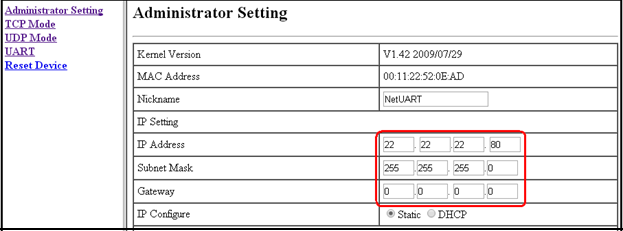
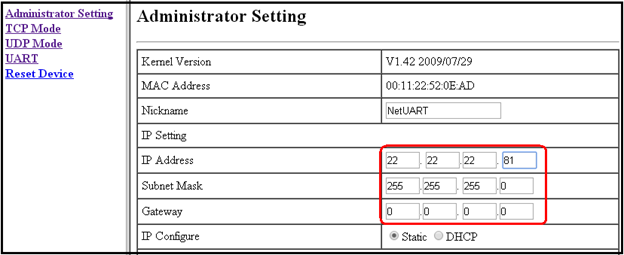
Choose one unit to act as the Server and one to operate as Client. Give both units a static IP address and Subnet Mask within the local network. Assign a Gateway if your device will be communicating outside of the local network. Do not give the units the same IP address.
Server IP
Client IP
Set up the Server Device
Select Server and choose a port. It is usually ok to leave the default port. 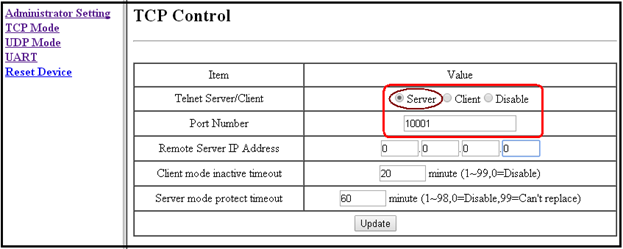
Set up the Client Device
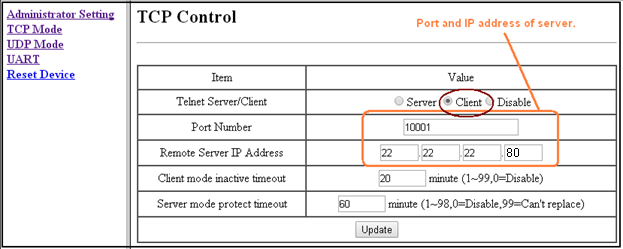
Select Client. In the box labeled Port number, enter the port of the Server unit. The remote server IP address is the IP of the Server.
Both Units
Be sure to match the serial settings with your serial equipment.
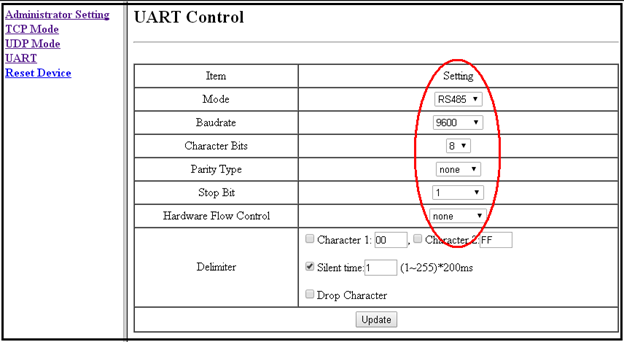
The basic settings are complete for creating a serial tunnel.