Application: 2 x Serial RS485 devices that need to communicate over a TCP connection.
When creating a serial tunnel using the Net485 you will need to have the units set up in a Client/Server relationship. In order to do this one unit will need to be set up as a Server (default) and one as a Client.
Server set up
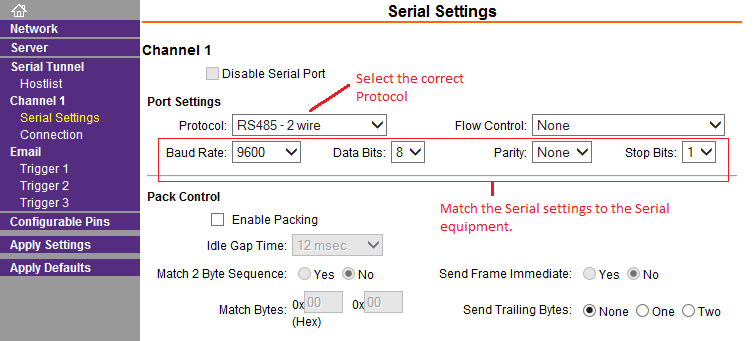
The Net485 is set as a server as the default setting. For this unit you will just need to set a static IP address and set the serial settings to match your RS485 device.
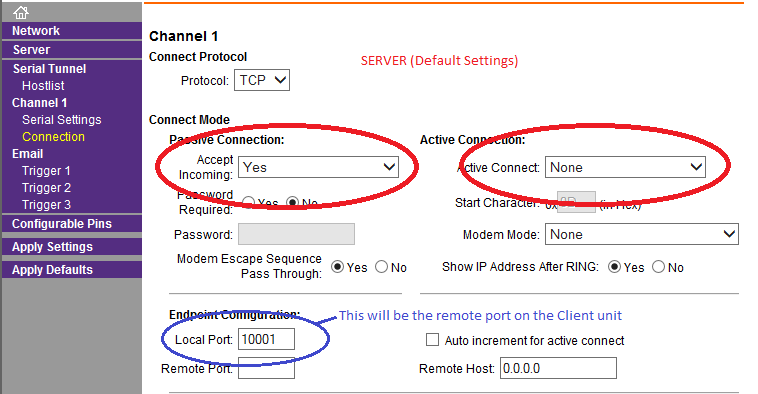
The Connection setting can stay at default for the Server.
Passive connection: Yes means it will be listening as a Server. It will be listening for a connection on the Local Port.
Active Connect: None means it will not initiate a TCP/IP connection. It will be listening for a connection from a Client.
Client set up
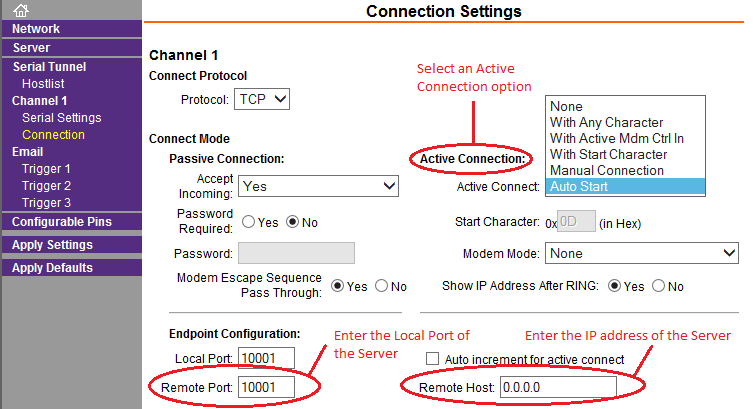
The Client unit will be set up the same to start. Assign a static IP address and match the serial settings to your RS485 device. For this unit there will be an additional setting under the Connection tab. Select the tab and look in the upper right for the Active Connect options. Choose "Auto Start' for a basic connection. You will also need to enter the Remote Host and Remote Port settings. The Remote Host IP will be the IP address of the Server, in this case the Server is the other Net485. The Remote port setting will be the Local port of the Server (default 10001). The Remote port and Local port on the Client unit can be the same value.